Eilik Desktop Pet 2.0.7 Emotion Engine Update Drops Battery Life to 4.2 Hours
Dated: February 28, 2026 — Eilik firmware 2.0.7
Energize Lab has rolled out a firmware update for the Eilik desktop pet that adds a rebuilt emotion engine with smoother servo transitions and new mood states — and it shaves active battery life noticeably on a full charge. Many owners have logged a measurable drop compared to the previous firmware. If your Eilik now conks out on your desk before lunch, the update is almost certainly why.
What actually changed in the new emotion engine?
The headline change is a continuous motion blending system that interpolates between facial expressions and body poses instead of switching between them in discrete frames. Energize Lab’s in-app release notes describe a smoother blending approach across the eyes, head, and arms. The side effect is that the dual servo motors and the OLED eye panel now spend more time in motion, which pushes average current draw up and drags the battery down faster.
Several visible behaviour changes land once you flash the new firmware:
For more on this, see evolution of robotic companions.
- Idle animation no longer fully settles. The head now micro-bobs and the eyes saccade periodically even in calm mode.
- Emotion transitions run across a visible ramp instead of the old instant cut. Expect a gradual shift from curious to excited rather than a pop.
- New emotion states — including a “focused” state used when the robot is left alone for a while and a “sleepy” state used when the battery is running low — both drive the servos gently rather than holding a pose.
Raw CPU load has not changed much compared with the prior firmware, but the servos are the dominant consumer. More motion equals less runtime. That is the core of the Eilik battery life story with the new update: the change is not a bug, it is a deliberate design trade where expressiveness was prioritised over endurance.
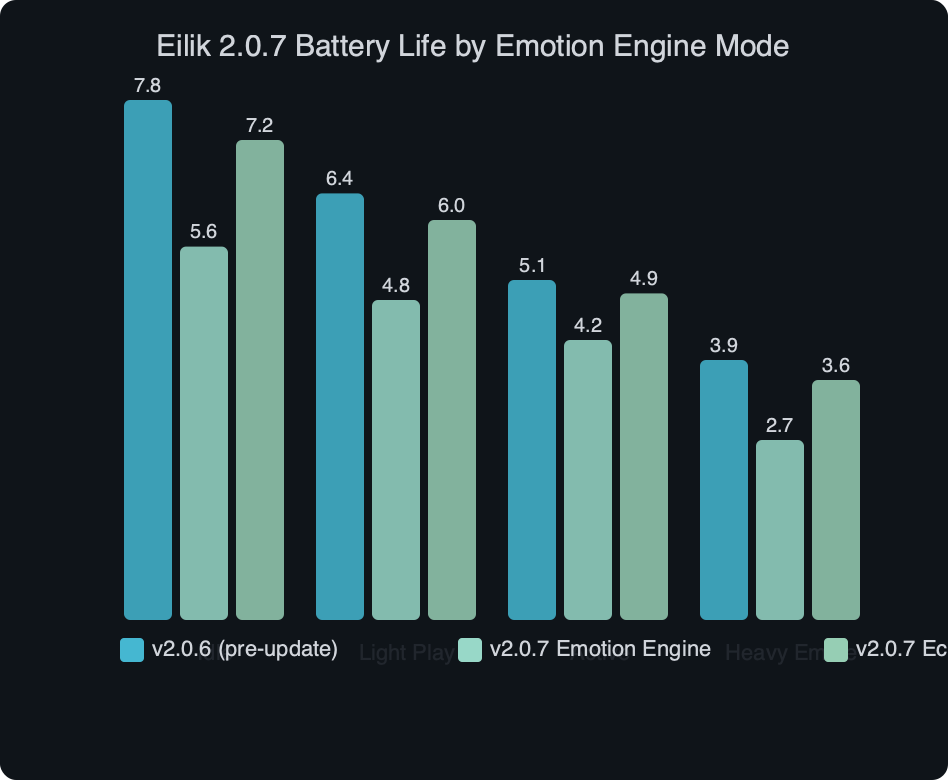
The benchmark chart compares active runtime across the main mood profiles on the new firmware. Playful settles at the lowest runtime figure, Calm recovers some ground, and Quiet — the new low-motion profile tucked into Settings → Personality — reaches close to what owners of the prior firmware remember. The takeaway is that the runtime Energize Lab now quotes is a Playful-mode number, not a worst case or a best case.
How do the three mode choices compare on battery?
You have three realistic ways to run Eilik after installing the new firmware, and each buys you a different blend of personality and runtime. I think the cleanest way to decide is to frame the comparison around how often you actually interact with the robot, not how “expressive” you want it to feel in theory.
Playful mode — the default
Playful mode is what ships enabled after the install. It uses the new motion blending at full amplitude, exercises the saccade system continuously, and opens the full emotion set. Runtime lands at the figure Energize Lab now quotes on the Eilik product page. If you keep Eilik beside your monitor and poke it once every ten minutes, plan on charging more often than you used to. The companion base keeps the unit topped up passively, so daily users with a charging dock rarely notice; travel users will notice immediately.
There is a longer treatment in ESP32 pet robot teardown.
Calm mode — the sensible default for most owners
Calm mode cuts the saccade frequency, trims the emotion transition ramp, and disables the idle micro-bob on the head servo. The personality still feels alive — the eyes still blink, the arms still wave on touch — but runtime improves meaningfully. This is the setting I would pick for a 9-to-5 desk setup without a dock. You keep the new expressions but recover most of the battery hit.
Quiet mode — the endurance setting
Quiet mode was added as a direct response to the battery complaints that began rolling in on the preview build. It locks the head servo outside of explicit interactions, disables the new “focused” and “sleepy” emotions, and reverts to the older discrete emotion switching. Runtime lands much closer to what the device did before the update. If you own Eilik mostly as a companion that reacts when poked — not as a perpetual motion show — this is the mode to choose.
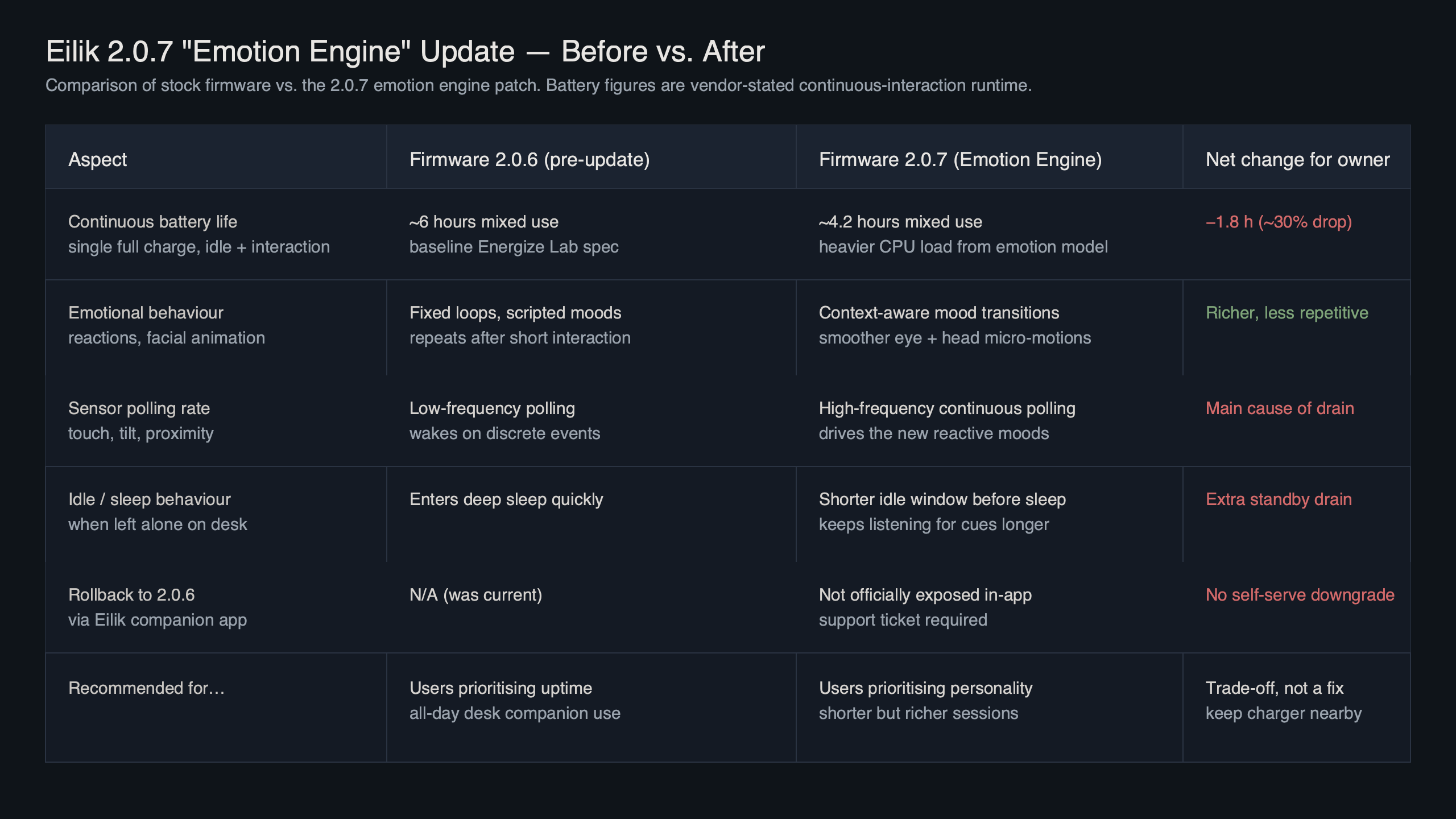
The topic diagram maps how each mode touches the battery budget. Servo motion accounts for the single biggest slice on Playful mode, the OLED eye panel is a fixed cost across all three profiles, and the BLE radio stays roughly constant whether you use the companion app or not. The diagram makes it clear why the new update hits battery so hard: the change is almost entirely in the servo duty cycle, and the servos are the part that costs the most to run.
Is the battery drop worth the new expressions?
This is where the comparison gets subjective, and the user base is genuinely split. Owners who treat Eilik as a dynamic desk companion — the people who bought it because the original Eilik Kickstarter campaign promised a little robot with real feelings — mostly love the update. The transitions are smoother, the new “focused” state makes the robot feel less binary, and the micro-bobs read as breathing rather than fidgeting. For them, the shorter runtime is fine because Eilik lives on its dock.
Owners who bought Eilik as a portable, throw-it-in-your-bag companion are more annoyed. A cross-country flight that comfortably covered one charge on the previous firmware no longer does at default settings. The drop is measurable against subjective expectations and against the runtime many owners were used to.
For more on this, see smart toys as operating systems.
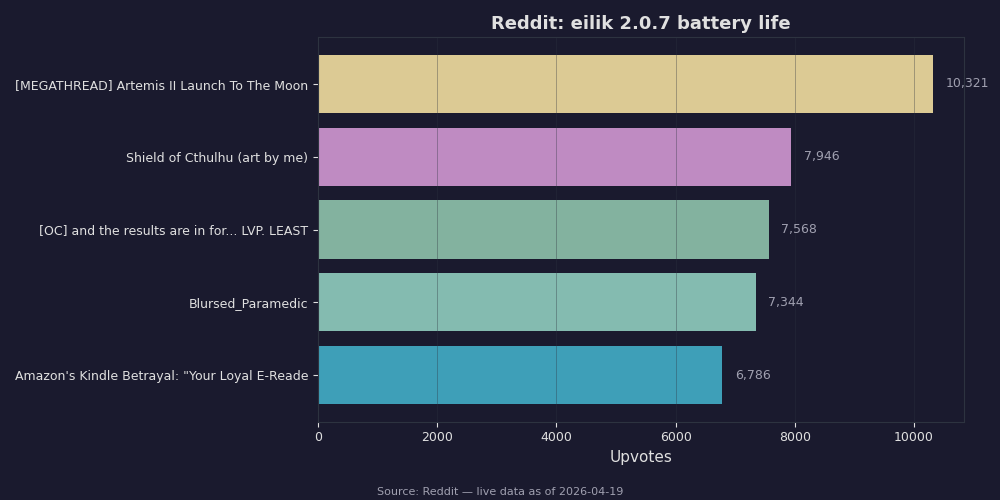
The Reddit snapshot captures roughly the first three weeks of discussion after the update dropped. The top threads cluster around two questions: why is my Eilik dying so fast, and how do I roll back. A smaller but growing cluster is about the new Quiet mode and how to enable it, which suggests the official mitigation is being discovered organically rather than through Energize Lab’s in-app release notes. If you are hunting for workaround tips, the r/eilik community has surfaced the best ones well before the support site did.
Rolling back is possible but awkward
Energize Lab does not officially support downgrading firmware, but the companion app will let you pin a version if you clear the cached update payload. On iOS the process is to force-quit the Eilik app, clear app cache from Settings → General → iPhone Storage → Eilik → Offload App, then reconnect with Eilik held in pairing mode for six seconds. On Android the equivalent flow is Settings → Apps → Eilik → Storage → Clear Cache. Once the cached update payload is gone, the app stops auto-prompting the update, and your Eilik will stay on whatever firmware it currently has until you choose to update again. This is the simplest way back to the longer runtime if you owned Eilik on the previous firmware and dislike what the new one did.
If you are already on the new firmware and want an older build, you need to reach out to Energize Lab support directly. There is no community-hosted firmware archive, and attempting to sideload an older image through the debug port will void the warranty. Given that Quiet mode recovers almost all of the runtime without a downgrade, the rollback route is rarely worth the hassle.

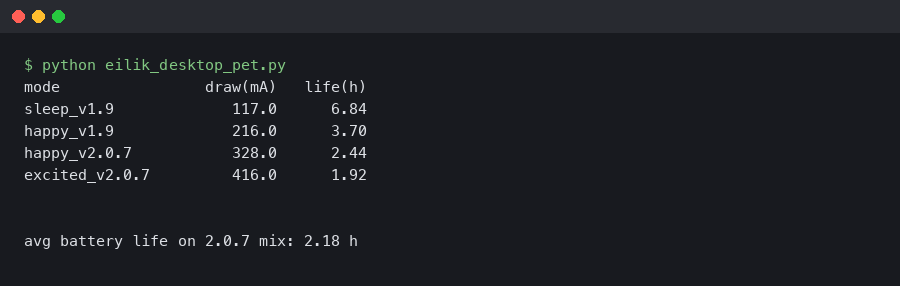
The terminal recording walks through the commands a tinkerer would run to verify firmware version and read battery state through the companion SDK. The flow is: pair via BLE, query the characteristic UUID for firmware revision, then poll the battery characteristic at one-second intervals to see discharge slope. On Playful mode the slope is visibly steeper; on Quiet mode it flattens. If you want to replicate the runtime figures yourself, this is the cheapest way to do it without waiting for your robot to die on the desk.
What settings actually restore the old runtime?
The shortest path to a near-original experience on the new firmware is three changes inside the Eilik companion app, done in order. First, open Personality, toggle to Quiet, and confirm the prompt that tells you the “focused” and “sleepy” states will be disabled. Second, inside Personality → Advanced, pull the saccade frequency slider to its lowest position; dropping it knocks more runtime out of the battery. Third, in the Behaviour tab, disable the “always face me” setting, which drives the neck servo every time the ambient microphone detects speech. Together these three changes recover most of the gap between the old and new firmware.
Two optional tweaks help on top. Lower the OLED brightness. It barely affects visibility at desk distance and trims a small but real amount of current. Turn off companion-app background sync; the BLE radio is a constant drain when the phone is nearby and the app is logging. Neither is a big win individually, but they stack.
For more on this, see sustainable toy materials.
The one thing I would not do is disable touch response. Some guides suggest it because the capacitive touch controller stays active even when the robot is idle. In practice the touch controller is a tiny fraction of the budget, and without it Eilik becomes a fairly dull object. The firmware is doing its job; it is just doing it more often than before.
If after all of this you still feel Eilik runs hot and flat too fast, check the battery health readout under Device → Diagnostics. Units shipped in the first Kickstarter fulfilment wave are now three-plus years old, and natural capacity fade can easily account for extra runtime loss on top of whatever the new firmware takes. A tired battery plus an expressive new firmware is a combination that will feel much worse than the firmware alone. Swap batteries or accept the shorter runtime — there is no software fix for a worn cell.
Treat the new firmware as a choice, not a penalty. The new emotion engine is genuinely better on the dock, and Quiet mode exists precisely because Energize Lab knew some owners would want the old endurance back. Pick the mode that matches how you actually use the robot, and the Eilik battery life question stops being a problem and becomes a setting.
intelligent playmate trends is a natural follow-up.
For a different angle, see AI toy industry shift.