
Sphero BOLT vs LEGO SPIKE: Which STEM Coding Robot Is Best?
I’ve unboxed, provisioned, and debugged hundreds of educational robots over the last decade. When you are tasked with setting up a robotics curriculum, a maker space, or even just buying a programmable platform for a tech-savvy kid at home, the paradox of choice is paralyzing. If you regularly follow Educational Robot News, you know the market is flooded with options. But time and time again, the decision boils down to a heavyweight title fight. The sphero bolt vs lego spike debate is the most common crossroads I see educators, parents, and fellow developers face today.
Both platforms promise to teach computational thinking. Both boast block-to-text coding pathways. Both cost a pretty penny. But under the hood, their hardware architectures, software ecosystems, and core pedagogical philosophies are fundamentally opposed. One is a sealed, indestructible telemetry gathering device; the other is a highly modular, mechanical prototyping workbench.
Let’s strip away the marketing fluff. I’m going to break down exactly what it’s like to write code, manage firmware, and build projects with both the Sphero BOLT and the LEGO Education SPIKE Prime, based on brutal, real-world deployment experience.
The Core Philosophy: Sealed Telemetry vs. Modular Engineering
Before we look at code, you have to understand what these devices are actually trying to be. In the realm of Programmable Toy News, form factor dictates function.
Sphero BOLT: The Unbreakable Sphere of Sensors
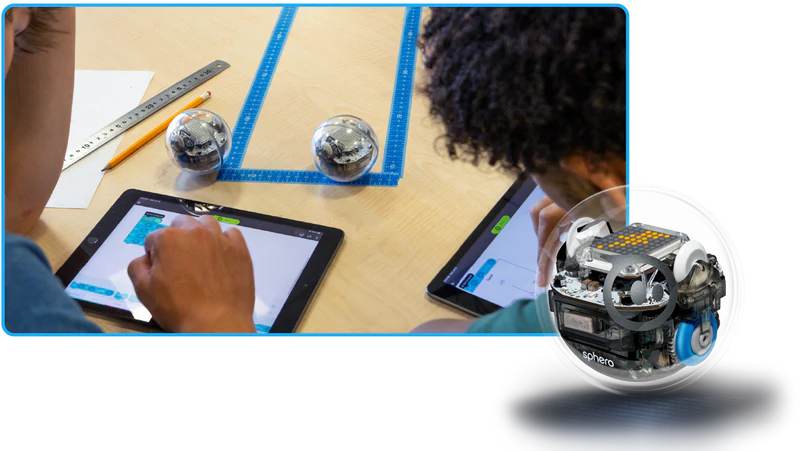
The Sphero BOLT is a masterclass in highly integrated hardware. It is a completely sealed, waterproof, scratch-resistant polycarbonate sphere. You cannot add a mechanical arm to it out of the box. You cannot change its wheels. You charge it inductively. From a hardware perspective, it’s a closed system.
However, this closed system is packed with an absurd amount of sensor tech. It features a 9-axis IMU (accelerometer, gyroscope, magnetometer), an ambient light sensor, a 360-degree infrared (IR) communication array for swarm robotics, and an 8×8 programmable LED matrix. The BOLT’s philosophy is kinematics and data. You write code to move it through space, and it feeds back high-resolution telemetry.
LEGO SPIKE Prime: The Prototyping Sandbox
On the opposite end of the spectrum, LEGO SPIKE Prime is the current darling of Smart Construction Toy News. It replaces the legendary LEGO Mindstorms EV3. The core of SPIKE is the Hub—a rectangular brain with a 5×5 LED matrix, a built-in 6-axis gyro, a speaker, and six universal input/output ports.
The Hub does nothing on its own. It requires you to plug in external motors (absolute positioning encoders), color sensors, distance sensors, and force sensors. You then build a chassis around it using the LEGO Technic system. The SPIKE philosophy is mechanical engineering and automation. You aren’t just writing code; you are building the physical machine that your code will control.
Hardware Breakdown: What’s Under the Hood?
When comparing the sphero bolt vs lego spike hardware, I look at durability, sensor reliability, and battery management—because in a real-world environment, these are the things that fail first.
Sphero BOLT Specs & Durability
The BOLT is practically indestructible. I have seen these things launched off tables onto concrete floors, driven through puddles of paint, and accidentally stepped on. They survive. The internal motors are highly responsive, though on hard, dusty floors, the smooth plastic shell can lose traction. (Pro tip: buy the aftermarket silicone nubby covers if you are running them on linoleum).
The inductive charging takes about 6 hours to go from 0 to 100%. This is a massive logistical bottleneck if you forget to dock them. However, once charged, the 2+ hour continuous battery life is stellar. The Bluetooth Low Energy (BLE) connection is rock solid, usually pairing to a host device within 2-3 seconds.
LEGO SPIKE Prime Specs & Expandability
The SPIKE Hub feels significantly lighter and more fragile than the old EV3 bricks, but the technicolor aesthetic hides a very capable micro-controller. The six LPF2 (LEGO Power Functions 2.0) ports are foolproof—you can plug any sensor or motor into any port, and the Hub dynamically registers it. This is a massive upgrade over the strict motor/sensor port division of the EV3.
The SPIKE battery is a 2000mAh lithium-ion pack that clicks into the bottom of the Hub. It charges via USB (Micro-USB on V1 hubs, USB-C on the newer ones). Battery life heavily depends on what you are doing. If you are driving three heavy Technic motors under load, you might only get 45 minutes of runtime. The modularity is its greatest strength, making it a staple in Modular Robot Toy News, but it introduces points of failure: cables get pinched, Technic pins get lost, and gears strip if abused.
The Programming Experience: Block to Text
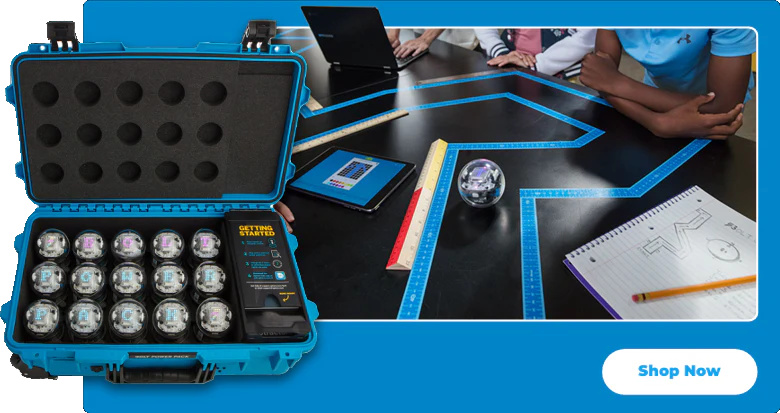
Both platforms use an app-based interface that starts with a Scratch 3.0-style block environment. Scratch is great for absolute beginners, but as a developer, I view blocks as a temporary bridge. The real test of an educational robot is its text-based API.
Sphero Edu App: A JavaScript Sandbox
The Sphero Edu app allows you to transition seamlessly from blocks to JavaScript. It’s not a pseudo-language; it’s actual JS executing within the app’s runtime, sending real-time Bluetooth commands to the BOLT.
The API is heavily asynchronous. Because you are waiting for physical movements to complete, you will be writing a lot of await statements. Here is a real-world example of how I teach asynchronous loops using the BOLT’s JavaScript API to drive in a square while manipulating the 8×8 matrix:
async function startProgram() {
  // Clear the matrix
  clearMatrix();

  // Set the main LED to a solid blue
  setMainLed({ r: 0, g: 0, b: 255 });
  await speak("Commencing perimeter sweep", true);

  for (let i = 0; i < 4; i++) {
    // roll(heading, speed, duration_in_seconds)
    await roll(90 * i, 60, 2);

    // Flash the matrix red at the corners
    setMatrixCharacter('X', { r: 255, g: 0, b: 0 });
    await delay(1000);
    clearMatrix();
  }

  stopRoll();
  await speak("Sweep complete", true);
}
This is fantastic for teaching modern web-dev concepts like promises, async/await, and JSON objects. However, the code executes on the host device (your iPad or Chromebook), not the robot. If the Bluetooth connection drops, the robot stops. It is a tethered execution model.
LEGO SPIKE App: The MicroPython Transition
LEGO SPIKE takes a different approach. The SPIKE App allows you to write Python (specifically MicroPython). Unlike Sphero, when you hit “Play”, the script is compiled, transferred, and executed directly on the SPIKE Hub’s internal processor. You can disconnect the Bluetooth tether, and the robot will happily keep running.
LEGO recently overhauled their Python API (moving from the older spike library to the newer hub and runloop architecture). It requires a deeper understanding of imports and event loops. Here is an example of driving a SPIKE Prime robot forward using the absolute positioning motors:
from hub import port
import runloop
import motor_pair
import motor

async def main():
    # Pair motors on ports A and B
    motor_pair.pair(motor_pair.PAIR_1, port.A, port.B)

    # Reset yaw angle on the built-in gyro
    # This is crucial for straight-line driving

    # Move forward at a speed of 500 for 1000 degrees of motor rotation
    await motor_pair.move_for_degrees(motor_pair.PAIR_1, 1000, 0, velocity=500)

    # Read a color sensor on Port C
    # Proceed only if the sensor sees red (color ID 9)
    # Note: Using pseudo-logic here to illustrate hardware interaction
    print("Movement complete, waiting for sensor input.")

runloop.run(main())
This API is closer to what you’d see in industrial robotics or Raspberry Pi projects. It teaches hardware interrupts, state machines, and embedded systems programming. If you are tracking AI Toy Sensors News, the way SPIKE handles real-time data from its peripheral sensors is far more analogous to how real autonomous vehicles operate.
Classroom and Living Room Logistics
When evaluating sphero bolt vs lego spike, do not ignore fleet management. If you are an educator, this is where you will spend 30% of your time.
Firmware Updates: Sphero BOLT handles firmware updates silently and quickly in the background via the Sphero Edu app. LEGO SPIKE Hubs, however, frequently require massive OS updates. If a student plugs a V1 hub into a V3 app, you might be staring at a “Flashing Firmware” screen for 10 minutes. This is a known pain point in the Robot Kit News community.
Device Compatibility: Both platforms support iOS, Android, macOS, Windows, and ChromeOS. However, the ChromeOS Bluetooth stack has historically been finicky. In my experience, iPads provide the most stable BLE connections for both Sphero and LEGO. If you are using cheap, low-spec Chromebooks, expect occasional connection drops, especially in a room with 15 other Bluetooth devices broadcasting.
Real-World Use Cases: Where Each Platform Shines
To truly answer which is best, we have to look at what you are actually trying to build.
Data Logging, Math, and Swarm Robotics (Sphero BOLT)
Because the BOLT’s sensors are so precise, it is an incredible tool for teaching physics and math. You can drop a BOLT down a ramp and use the app’s live sensor dashboard to graph velocity and acceleration over time. It makes abstract calculus concepts tangible.
Furthermore, the BOLT has 360-degree IR emitters and receivers. You can write code that allows multiple BOLTs to talk to each other. I’ve built projects where one “infected” BOLT turns its matrix red, and if it physically bumps into a “healthy” green BOLT, the green one turns red. Try doing that with any other kit on the market. It’s a prime example of why BOLT dominates AI Toy Interaction News.
Mechanical Engineering, Automation, and FLL (LEGO SPIKE)
SPIKE Prime is the uncontested king of mechanical logic. You aren’t just coding; you are designing gear trains, calculating torque vs. speed, and building pneumatic systems (with expansion kits). If a student wants to build a robotic arm that sorts colored bricks on a conveyor belt, SPIKE is the only tool for the job.
SPIKE is also the official platform for the FIRST LEGO League (FLL). If your goal is to prepare a student for competitive robotics, where they have 2.5 minutes to autonomously navigate a mat and complete physical missions, SPIKE is a mandatory ecosystem.
Price and Ecosystem Value in Educational Robot News
Let’s talk budgets. Neither of these ecosystems is cheap.
A single Sphero BOLT retails for roughly $179. For that price, you get the robot, the inductive charger, and a protractor. That’s it. However, there are zero ongoing costs. There are no parts to lose. A BOLT you buy today will likely function perfectly five years from now, assuming the battery doesn’t completely degrade.
The LEGO SPIKE Prime Set retails for around $399. This includes the Hub, three motors, three sensors, and over 500 Technic elements. You can also purchase the SPIKE Prime Expansion Set (around $130) which adds larger wheels, more gears, and an extra motor. The initial outlay is significantly higher, and you will lose parts. You will have to buy replacement pins and gears. However, the replay value is arguably infinite because it integrates with every standard LEGO Technic piece manufactured in the last 25 years.
If you are exploring Toy Factory / 3D Print AI News, both platforms have vibrant communities on Thingiverse and Printables. You can 3D print custom chariots for the Sphero BOLT to drag around, or print custom sensor mounts compatible with LEGO Technic pins to attach third-party Arduino sensors to your SPIKE builds.
Verdict: Sphero BOLT vs LEGO SPIKE – Which Should You Choose?
After deploying thousands of lines of code to both platforms, my recommendation is strictly tied to your primary learning objective.
Choose the Sphero BOLT if:
- Your primary focus is pure software engineering and data analysis.
- You want to teach JavaScript in a fun, visual way.
- You are in an environment where durability is the highest priority (e.g., lower middle school classrooms, library maker spaces).
- You want zero setup and teardown time. You just connect and code.
Choose the LEGO SPIKE Prime if:
- Your goal is teaching robotics—the intersection of software, electrical, and mechanical engineering.
- You want to teach Python and embedded systems logic.
- The user loves to build, iterate, and tinker with physical hardware.
- You plan on competing in FIRST LEGO League or similar robotics competitions.
There is no “loser” in the sphero bolt vs lego spike comparison. They are both top-tier tools. But forcing a kid who wants to build a robot arm to use a Sphero, or forcing a kid who wants to write complex swarm-logic algorithms to build a LEGO chassis first, is a recipe for frustration. Match the hardware to the educational goal.
Frequently Asked Questions (FAQ)
Can you program Sphero BOLT and LEGO SPIKE with Python?
LEGO SPIKE Prime natively supports MicroPython through the official SPIKE App, allowing scripts to run directly on the Hub. The Sphero BOLT does not natively support Python in the official Sphero Edu app; it uses JavaScript. However, advanced users can use third-party wrappers like the spherov2 Python library to control the BOLT via a Bluetooth-enabled computer.
Which is better for teaching mechanical engineering?
LEGO SPIKE Prime is vastly superior for teaching mechanical engineering. Because it is built on the LEGO Technic system, users can experiment with gear ratios, levers, pulleys, and structural integrity. The Sphero BOLT is a sealed sphere with no moving external parts, making mechanical prototyping impossible out of the box.
Are Sphero BOLT and LEGO SPIKE Prime compatible with Chromebooks?
Yes, both platforms have official apps available for ChromeOS. They connect to the robots using Bluetooth Low Energy (BLE). However, performance heavily depends on the Chromebook’s hardware; low-end Chromebooks may occasionally drop Bluetooth connections in classrooms with high wireless interference.
How durable is the Sphero BOLT compared to LEGO SPIKE?
The Sphero BOLT is exceptionally durable, featuring a sealed, waterproof, and scratch-resistant polycarbonate shell that can survive drops and kicks. The LEGO SPIKE Prime Hub is much more fragile; while the Technic bricks can withstand rough play, dropping the electronic Hub on a hard floor can damage the internal sensors or screen.
Final Takeaway
If you are making the final call on the sphero bolt vs lego spike debate, remember this: software is only half the equation in robotics. The Sphero BOLT removes the friction of hardware creation, allowing you to dive straight into complex JavaScript, kinematics, and data logging within seconds. The LEGO SPIKE Prime embraces the friction of hardware creation, forcing you to solve physical engineering problems before your MicroPython code can ever execute. Assess your environment, acknowledge your budget for replacement parts, and choose the platform that aligns with whether you want to raise a software developer or a mechanical engineer.