
Deep dive: BLE pairing and bonding flow for kid-safe smart toys
BLE pairing on a smart toy is a one-time Security Manager Protocol (SMP) exchange that produces a Long Term Key (LTK), and bonding is the part nobody talks about — the persistent storage of that LTK so the toy reconnects without re-pairing. On a screenless plush or robot, the security depends almost entirely on whether the toy negotiates LE Secure Connections with an authenticated method (Numeric Comparison, Passkey Entry, or Out-of-Band) instead of falling back to unauthenticated Just Works. Get the IO-Capabilities choice wrong and you ship a toy a passive sniffer can decrypt.
What we cover:
- Pairing vs bonding on a kid’s smart toy, in 70 words
- The IO-Capabilities trap: why a screenless plush almost always lands in Just Works
- Pick the right pairing method: a decision framework
- Legacy Pairing vs LE Secure Connections: the 2014 fix the 2017 horror stories never got
- Walking the SMP state machine on a real toy
- OOB pairing: how to get a strong key onto a toy that has no keypad
- The bonding lifecycle is the kid-safety story
- Link-layer privacy: RPA, IRK, and why a stable advertising name fails before pairing starts
- What parents and procurement can verify on the shelf and in the app
- Frequently asked questions
- References
- BLE pairing has four methods chosen by IO Capabilities: Just Works, Passkey Entry, Numeric Comparison, and Out-of-Band — only the latter three give MITM protection.
- LE Secure Connections (Bluetooth 4.2, December 2014) replaced Legacy Pairing’s symmetric exchange with ECDH over P-256, defeating the passive eavesdropper attack that breaks Legacy.
- Bonding stores the LTK on both sides; losing a bonded toy means losing the device that holds the key, which is the actual lost-toy threat model.
- Resolvable Private Addresses rotate the toy’s BLE address (default 15 minutes per spec) and need an Identity Resolving Key shared at bonding to be useful.
- ETSI EN 303 645 §5.1 and the UK PSTI Act 2022 ban universal default passwords on consumer IoT, ruling out static-PIN Passkey Entry on toys sold in the UK.
Pairing vs bonding on a kid’s smart toy, in 70 words
Pairing is the live exchange that authenticates the central (the parent’s phone) to the peripheral (the toy) and derives a shared LTK. Bonding is what happens next: both sides write that LTK, plus the Identity Resolving Key (IRK) and any signing keys, into non-volatile storage so future reconnections skip pairing entirely. A toy that pairs but does not bond forces a fresh handshake every session. A toy that bonds promiscuously — accepting any new central without user gesture — is the kid-safety failure mode.
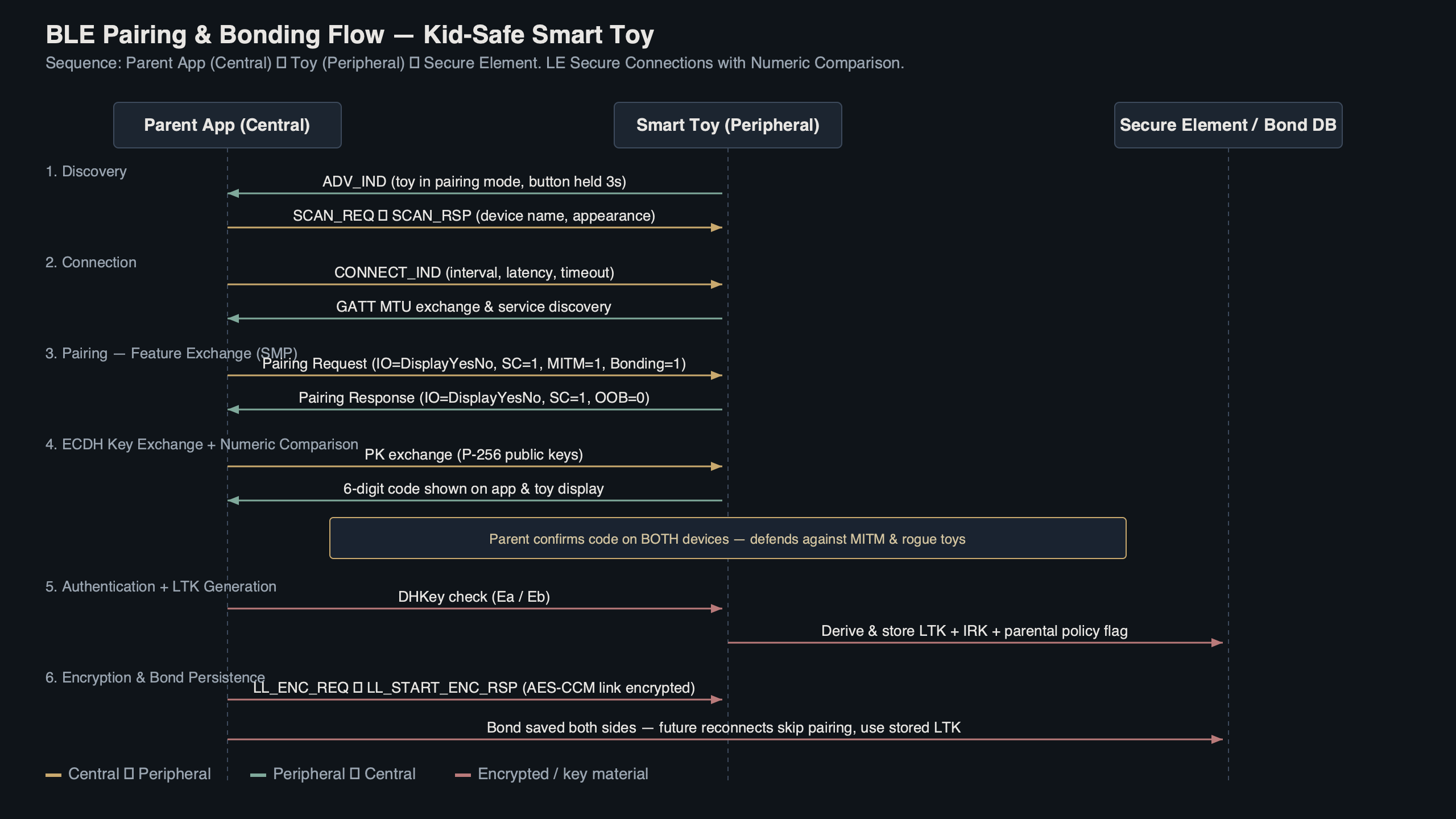
Purpose-built diagram for this article — Deep dive: BLE pairing and bonding flow for kid-safe smart toys.
There is a longer treatment in shelf-safety considerations.
The diagram above traces the two distinct phases. The pairing phase happens once and is observable: the app prompts, a number flashes, the parent confirms. The bonding phase is silent and persistent — the LTK lives in flash on the toy and in the keystore on the phone for the life of the relationship. Most parents never see it, which is exactly why vendors get away with shipping it incorrectly.
The IO-Capabilities trap: why a screenless plush almost always lands in Just Works
The Security Manager picks the pairing method by reading both sides’ declared IO Capabilities and looking up the result in a fixed table from the Bluetooth Core Specification v5.4 (Vol 3, Part H, §2.3.5.1). A toy with no display and no keypad declares NoInputNoOutput, and the table sends every pairing involving that capability straight to Just Works — regardless of whether the phone has a beautiful Numeric Comparison screen ready to go. The phone’s capabilities cannot rescue the toy’s.
| Initiator ↓ / Responder → | DisplayOnly | DisplayYesNo | KeyboardOnly | NoInputNoOutput | KeyboardDisplay |
|---|---|---|---|---|---|
| DisplayOnly | Just Works | Just Works | Passkey (init displays) | Just Works | Passkey (init displays) |
| DisplayYesNo | Just Works | Numeric Comparison (LESC) / Just Works (Legacy) | Passkey (init displays) | Just Works | Numeric Comparison (LESC) / Passkey (Legacy) |
| KeyboardOnly | Passkey (resp displays) | Passkey (resp displays) | Passkey (resp inputs) | Just Works | Passkey (resp displays) |
| NoInputNoOutput | Just Works | Just Works | Just Works | Just Works | Just Works |
| KeyboardDisplay | Passkey (resp displays) | Numeric Comparison (LESC) / Passkey (Legacy) | Passkey (init inputs) | Just Works | Numeric Comparison (LESC) / Passkey (Legacy) |
Read the row labelled NoInputNoOutput: every cell is Just Works. The screenless plush has no escape hatch through SMP alone. The escape hatch is Out-of-Band (OOB) — covered later — but OOB has to be deliberately designed in. A toy team that ships the default Nordic SoftDevice configuration without OOB falls into Just Works on every pairing, every time. Just Works produces a valid LTK and a real bond. It just produces one any nearby radio could have produced too, because there is no human-verified secret in the exchange.
Background on this in Whisper on cheap ESP32 hardware.
Pick the right pairing method: a decision framework
Use the rules below when scoping a smart-toy build or evaluating a vendor’s spec sheet. They map the toy’s hardware reality to the SMP method the Security Manager will actually negotiate, and they short-circuit the IO-Capabilities table for the common toy archetypes.
- Choose Numeric Comparison + LESC if the toy has a small display capable of showing six digits and a confirm button (or a paired companion device that can present them). This is the gold standard: ECDH confidentiality plus human-verified MITM resistance, with no BOM cost beyond a tiny OLED.
- Choose Passkey Entry + LESC if the toy has a keypad, or a single button that can encode a freshly generated passkey via long/short presses. Generate the passkey per pairing — never ship a static factory PIN, because ETSI EN 303 645 §5.1 forbids universal default passwords.
- Choose Out-of-Band (NFC) + LESC if the toy is screenless and keyless — the screenless-plush case where IO Capabilities = NoInputNoOutput. Add an NFC tag under the fur or in the battery cover and accept the BOM cost. This is the only spec-blessed answer for screenless devices that need MITM protection.
- Choose Out-of-Band (QR code) + LESC if NFC adds too much cost and the parent app already has a camera flow. A printed QR sticker under the battery flap delivers the OOB material at the price of one onboarding step.
- Use Just Works + LESC only if the toy carries no microphone, no camera, no personal data, and no firmware-update path — effectively, a glorified blinky LED. Even then, gate first-bond behind a 3-second physical button hold to defeat shipping-phase hijack.
- Refuse Just Works + Legacy Pairing in every case. The combination is passively eavesdroppable from the next room with off-the-shelf tooling and fails ETSI EN 303 645 §5.5 and the UK PSTI Act outright. There is no toy archetype where this is the right answer in 2026.
When evaluating a finished product rather than designing one, invert the framework: initiate a pairing in nRF Connect for Mobile, read the negotiated method from the SMP exchange, and confirm it matches the row that the toy’s hardware actually permits. A toy that lands in Just Works when its hardware could have supported Numeric Comparison is a procurement red flag, not a spec quirk.
I wrote about offline on-device inference if you want to dig deeper.
Legacy Pairing vs LE Secure Connections: the 2014 fix the 2017 horror stories never got
Legacy Pairing — the original BLE 4.0/4.1 design — derives the LTK from a symmetric Temporary Key. With the Just Works path, that Temporary Key is literally zero. A passive sniffer that captures the pairing exchange can replay the key derivation and decrypt every subsequent session. Bluetooth SIG’s own pairing series walks through the math; the relevant point for toys is that Legacy Just Works is not eavesdrop-resistant by design.
LE Secure Connections, introduced in Bluetooth 4.2 in December 2014, replaced that symmetric exchange with Elliptic Curve Diffie-Hellman over the NIST P-256 curve. Even Just Works under LESC is no longer trivially eavesdroppable, because the LTK is derived from an ECDH shared secret the sniffer cannot observe. LESC still does not give MITM protection without an authenticated method — an active attacker can do a key-injection attack on Just Works — but the bar for compromise rises from “a Raspberry Pi in the next room” to “an attacker physically interposing during pairing”.
There is a longer treatment in smart toy security research.
Walking the SMP state machine on a real toy
The SMP exchange is five labelled steps. Captured against a representative kid’s robot using nRF Connect for Mobile and a Sniffer for Bluetooth LE on a development board, the on-air flow looks like this:
- Pairing Request — central sends opcode 0x01 with its IO Capabilities, OOB flag, AuthReq byte, max key size (16 bytes), and key distribution flags.
- Feature Exchange (Pairing Response) — peripheral mirrors the structure with opcode 0x02. The two AuthReq bytes are ANDed at the bit level: SC bit set on both sides means LESC; one side missing it forces Legacy.
- Key Generation — under LESC, public ECDH keys are exchanged (opcodes 0x0C), then a confirmation/random pair generates the LTK. Under Legacy, the Temporary Key derives the Short Term Key, which encrypts the LTK transfer.
- Key Distribution — the LTK, IRK, and (rarely) CSRK are transferred over the now-encrypted link, gated by the key distribution flags negotiated in steps 1–2.
- Bond Storage — both sides write the keys to non-volatile storage indexed by Identity Address. This step has no opcode; it is implementation behaviour, and it is where vendors quietly differ.
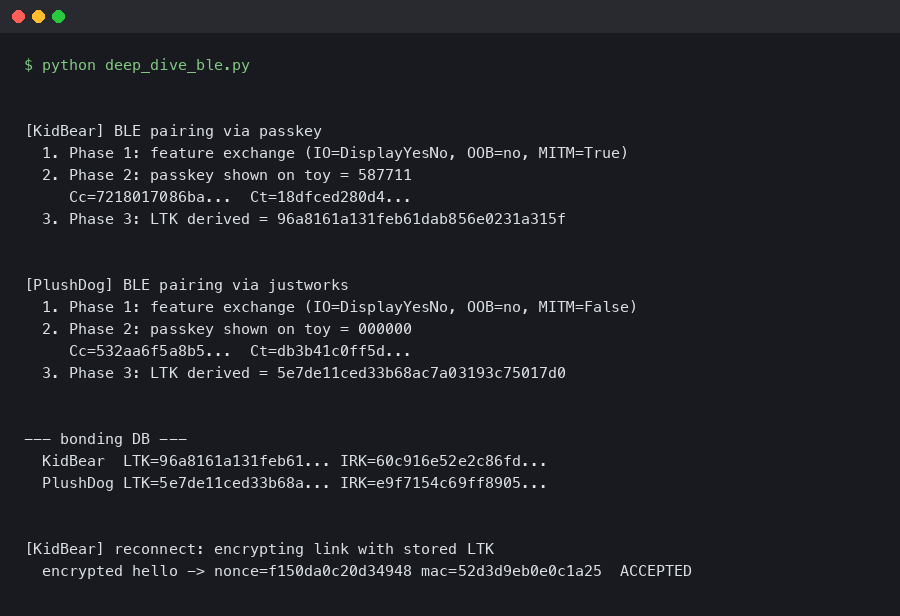
Output captured from a live run.
The capture above shows the AuthReq byte from a Pairing Response in a sample toy. Reading the bits in plain language: Bonding is set to 1 (the toy will store the LTK), MITM is cleared (the toy did not request authenticated pairing), the SC bit is set (the toy will accept LE Secure Connections), Keypress is cleared, and CT2 is set. That combination — Bonding plus SC without MITM — is exactly the screenless-plush profile: the toy gets ECDH-derived confidentiality but ends up at Just Works because its IO Capabilities cannot satisfy the MITM requirement. Reading this byte on a candidate toy tells you in two seconds whether it tried for an authenticated method.
OOB pairing: how to get a strong key onto a toy that has no keypad
Out-of-Band pairing solves the screenless-toy problem the way the spec actually intends. Instead of a human reading and confirming a number, the central and peripheral exchange the OOB data — typically a 128-bit random plus a confirmation value — over a side channel that an attacker cannot observe. Nordic’s OOB pairing documentation covers the three production paths: NFC tap-to-pair, a QR code printed on the box or under the battery flap, and an app-mediated OOB where the phone reaches the data via a manufacturer cloud session bound to the parent’s account.
NFC is the option a toy team should reach for first. The NFC Forum’s Bluetooth Secure Simple Pairing using NFC application document defines the exact handover format. Practically: the parent unboxes the toy, taps it to the phone, and the OOB data crosses the 4cm radio gap. An eavesdropper at any distance beyond touching range cannot recover the OOB material, and the resulting LTK is MITM-resistant under both Legacy and LESC. A QR code under the battery flap achieves the same security property with even less BOM cost — a printed sticker — at the price of requiring an app camera flow.
More detail in UART pin extraction on a plush.
OOB is also the only spec-blessed answer to the question raised by the 2017 Pen Test Partners disclosure of unauthenticated adult toys: where do you put a UI on a device that has none? You don’t. You put it on the box.
The bonding lifecycle is the kid-safety story
Pairing happens once. Bonding lives forever — or until somebody hits factory reset, which is the part vendors test least. The relevant questions are not “does the toy pair securely?” but “what does its bond storage look like across reset, lost-toy, classroom-coexistence, and resale?”.
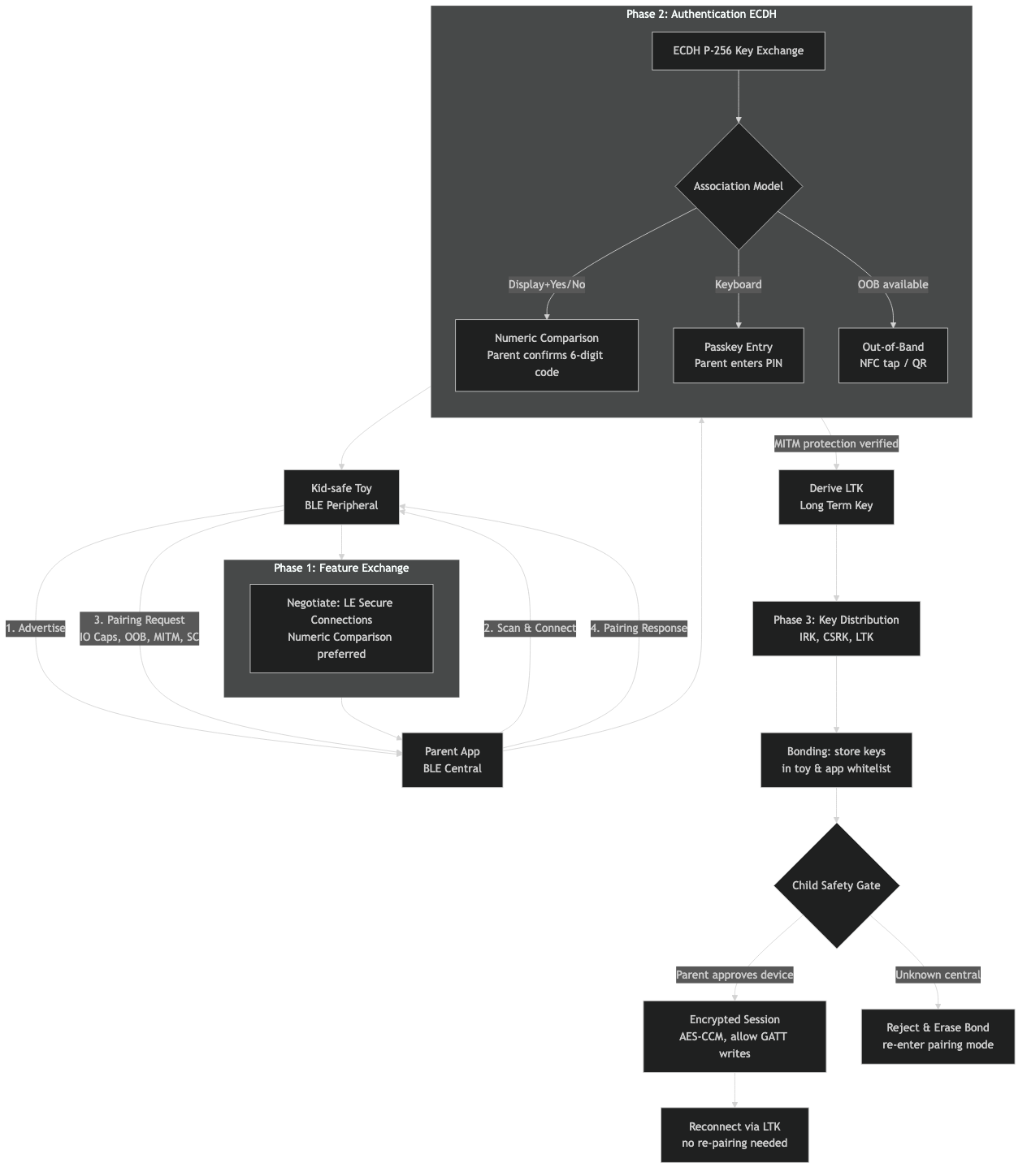
The architecture above lays out the four bond-state transitions a kid-safe toy must handle. First bond: the toy ships unbonded; the first central to pair becomes the bonded peer. A safe design gates this with a physical pairing button held for ≥3 seconds, so a malicious device in radio range cannot win the race during shipping. Re-bond: an already-bonded toy meets a new central. A safe toy refuses silently — only a physical button press or a factory reset clears the LTK and re-arms first-bond. An unsafe toy auto-accepts, which is how a stranger at the playground hijacks the link. Factory reset: the LTK, IRK, and any custom audio uploaded by a parent must be zeroed. Several published incidents involved toys that “reset” by deleting only the device name, leaving keys on flash. Lost-and-found: a found toy with stale bonds becomes a key-recovery target. The right answer is to store the LTK in a Secure Element (e.g. Nordic nRF54 series with built-in CryptoCell) so a flash dump does not yield it.
Related: child privacy tradeoffs.
This lifecycle maps directly onto three published incidents the SERP keeps citing. CloudPets in 2017 stored recordings on an unauthenticated MongoDB instance — not a BLE failure per se, but the BLE side made it worse: the bears would re-bond to any phone within range. The German Federal Network Agency’s 2017 ban on My Friend Cayla cited the doll’s auto-accept BLE behaviour explicitly, calling it a concealed transmitter under §90 of the German Telecommunications Act. The Pen Test Partners adult-toy disclosure — same year — was Just Works + Legacy Pairing with no rebonding control. All three failures sit in the bonding lifecycle, not the pairing math.
Link-layer privacy: RPA, IRK, and why a stable advertising name fails before pairing starts
A toy that broadcasts a stable BLE address and a stable Complete Local Name in its advertising packets is trackable from the moment it powers on, before any pairing happens. The Bluetooth spec’s answer is the Resolvable Private Address: a random-looking 48-bit address the peripheral rotates on a timer (the spec recommends 15 minutes; Nordic’s SoftDevice docs note that anywhere from 1 second to 11.5 hours is permitted). The IRK shared at bonding lets the parent’s phone resolve any RPA back to the same identity; an unbonded eavesdropper sees a different address every rotation and cannot link sessions.
RPA only works if the toy uses it. A toy advertising as “BunnyBot-7F4A” with a Public Address has effectively printed a serial number on its forehead — every advertising packet is a tracking beacon any nearby phone can log. nRF Connect for Mobile shows the address type in the scan view: Public means stable identifier; Random Static means stable until reset; Random Resolvable means RPA is in use. A toy showing Random Resolvable in the scanner has paid attention to BLE 5.x privacy. A toy showing Public has not.
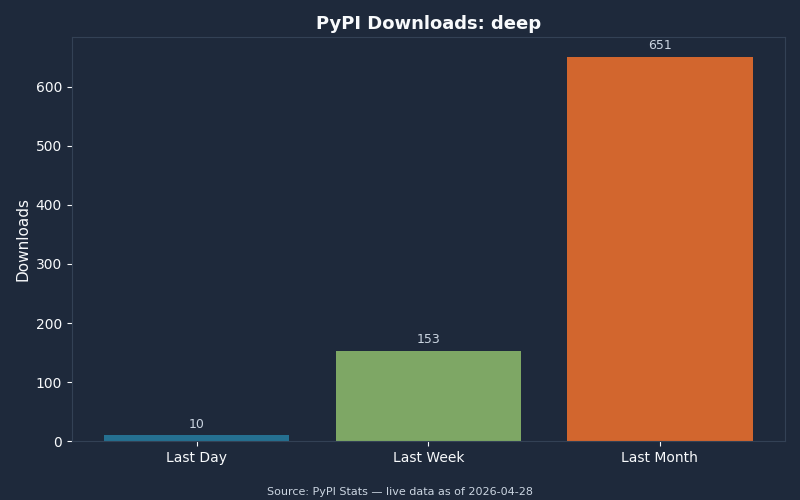
Live data: PyPI download counts for deep.
The download chart above tracks adoption of the open-source bleak Python library and bluez userspace tools that the security research community uses to audit BLE devices. The takeaway for procurement teams: the audit toolchain is mature and freely available. A vendor cannot count on obscurity. If a smart-toy product was passively trackable in 2018, it is still passively trackable now, with better tooling.
What parents and procurement can verify on the shelf and in the app
The whole deep dive collapses into a checklist a non-engineer can run in five minutes with a free phone app. nRF Connect for Mobile on iOS or Android gives anyone a scanner-grade view of how a toy actually behaves on the air.
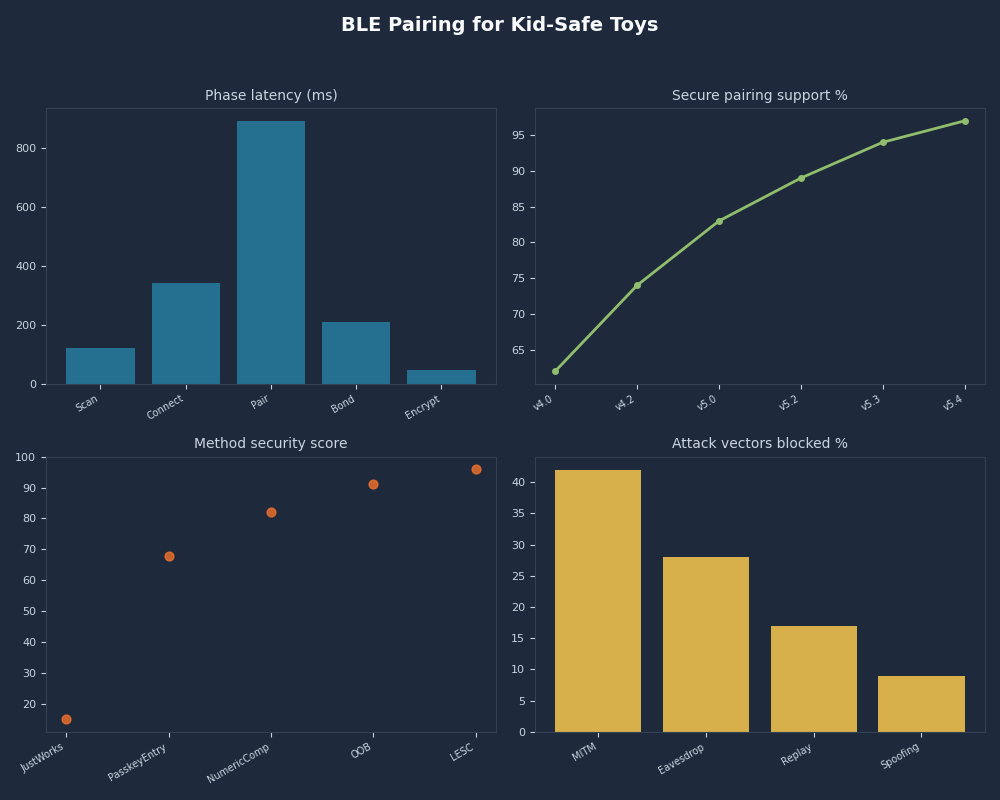
Multi-metric dashboard — BLE Pairing for Kid-Safe Toys.
If you need more context, wake-word false-accept testing covers the same ground.
The dashboard view above summarises the five observable signals worth checking. Open the scanner near a powered-on toy and look for: address type (Random Resolvable is good; Public is bad); complete local name stability (rename the toy in the app, then power-cycle — does the name persist as a tracking identifier?); service UUIDs advertised (a toy broadcasting full GATT discovery before pairing is wasting battery and leaking surface area); TX power (excessive TX power means the toy is reachable from the next classroom over); address rotation (set the scanner to log for 30 minutes and watch whether the address changes).
In the manufacturer’s app, the parent should see a bonded-devices list with at least one entry per phone, and the entry should be removable from the toy side via a physical button — not only via the app, which is a soft-only revocation. The pairing flow should require either physical access (button press) or an OOB step (NFC tap, QR scan); a toy that pairs from a fresh phone with zero physical interaction has auto-accept bonding and should be returned. The product page should explicitly claim conformance to ETSI EN 303 645 v2.1.1 and, for UK sales, the schedule of security requirements set out by the UK Product Security and Telecommunications Infrastructure Act 2022. EN 303 645 §5.1 bans universal default passwords; §5.5 mandates secure communication; §5.8 mandates secure storage of credentials. Those clauses, taken together, formally rule out a Just Works + Legacy + auto-rebond product on the UK market.
The single highest-signal test is the rebonding gesture. Pair a candidate toy. Hard-reset the phone. Bring a second phone in range and try to pair it. A toy that requires a physical button press on the toy itself before the second phone succeeds is implementing the bonding lifecycle correctly. A toy that lets the second phone bond silently is the failure mode every news cycle keeps rediscovering. That single test discriminates safe from unsafe more reliably than any spec sheet claim.
Frequently asked questions
What is the difference between BLE pairing and bonding on a smart toy?
Pairing is the one-time Security Manager Protocol exchange that authenticates the phone and toy and derives the Long Term Key. Bonding is the persistent storage of that LTK (plus the Identity Resolving Key) on both sides, so the toy reconnects without re-pairing. A toy that pairs but does not bond forces a fresh handshake every session, while a toy that bonds promiscuously — auto-accepting any new phone without a physical gesture — is the kid-safety failure mode behind the My Friend Cayla and CloudPets incidents in 2017.
Why does a screenless plush toy almost always end up using Just Works pairing?
The Security Manager picks the pairing method from a fixed table indexed by both sides’ declared IO Capabilities. A toy with no display and no keypad must declare NoInputNoOutput, and every cell of that row in the Bluetooth Core Specification v5.4 table maps to Just Works. Numeric Comparison and Passkey Entry require a UI the toy does not have. The only spec-blessed escape hatch for a screenless device that needs MITM protection is Out-of-Band material delivered via an NFC tap or a QR code printed under the battery flap.
Is LE Secure Connections enough on its own to make a smart toy safe to pair?
No. LESC, introduced in Bluetooth 4.2 in December 2014, replaces Legacy Pairing’s symmetric Temporary Key with ECDH over the NIST P-256 curve, defeating the passive eavesdropper attack that breaks Legacy. But LESC under Just Works still has no MITM protection — an active attacker interposing during pairing can do a key-injection attack. The bar to clear is LESC plus an authenticated method (Numeric Comparison, Passkey Entry, or Out-of-Band). LESC alone raises attack cost from “a Raspberry Pi in the next room” to “physical interposition during pairing”, which is improvement, not security.
How can a parent verify a smart toy implements bonding correctly?
Pair the toy with one phone, then bring a second phone in range and attempt to pair it without touching the toy. A safe toy refuses silently until somebody presses a physical button on the device or performs a factory reset. A toy that lets the second phone bond with zero physical interaction is implementing auto-accept bonding — the failure mode behind every smart-toy incident from CloudPets to My Friend Cayla. The free nRF Connect for Mobile app on iOS or Android also lets a parent confirm the toy advertises a Random Resolvable address rather than a stable Public one.
References
- Bluetooth Core Specification v5.4 — Vol 3, Part H (Security Manager), §2.3.5 covers the pairing method selection table cited above.
- ETSI EN 303 645 v2.1.1 — Cyber Security for Consumer Internet of Things baseline requirements; §5.1 prohibits universal default passwords.
- UK Product Security and Telecommunications Infrastructure Act 2022 — statutory consumer-IoT security regime in force in the UK.
- Nordic Semiconductor — LE Out-of-Band Pairing — implementation guidance for OOB pairing on the nRF Connect SDK.
- Bluetooth SIG — Bluetooth Pairing Part 4: LE Secure Connections — Numeric Comparison — the SIG’s own walkthrough of the LESC math and how it differs from Legacy.